Using your temporary AWS S3 credentials
This page explains how to use the temporary S3 credentials provided by our platform. Whether you prefer the command line or a bit of Python, we’ve included examples to help you get started quickly.
Generating Your Temporary Credentials
- Log in to your account.
- Click on the Workspaces tab at the top.
- Select the Credentials tab.
- Click on the S3 Token sub-tab.
- Finally, click the Request Temporary AWS S3 Credentials button. A popup similar to the one below will appear:
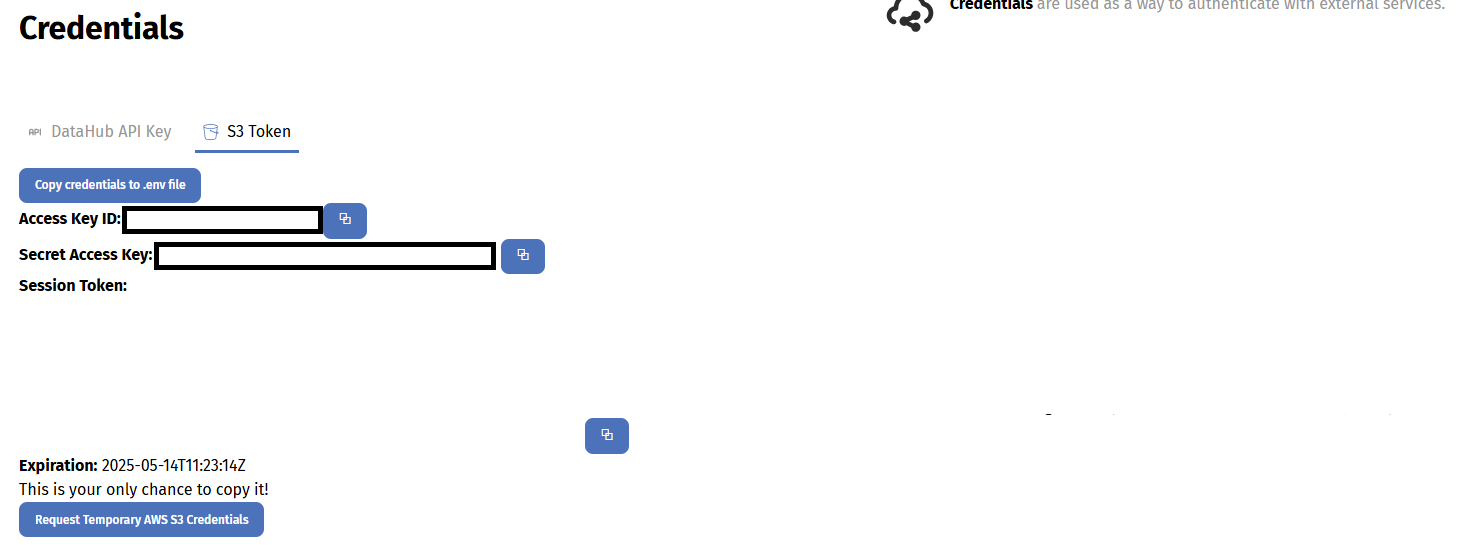
Access Key ID: e.g. ASIATNVEVXXXXX
Secret Access Key: e.g. eeLV8XXXXX
Session Token: e.g. IQoJb3JpZXXXXX
Expiration: e.g. 2025-02-18 16:17:54 +0000 UTC
Warning
These credentials are temporary and expire after 1 hour. Make sure you generate new ones before they expire.
Understanding Your Credentials
- Access Key ID & Secret Access Key: These work together as your username and password for accessing your S3 bucket.
- Session Token: This is an extra security token needed to verify your session.
- Expiration: This tells you when the credentials will no longer be valid. Credentials last for 1 hour from the time they are generated.
Remember, you’ll need all three items when connecting to S3.
Using the AWS CLI
If you haven’t already, please install the AWS CLI. Then, set your credentials in your shell session:
export AWS_ACCESS_KEY_ID="ASIATNVEVXXXXX"
export AWS_SECRET_ACCESS_KEY="eeLV8XXXXX"
export AWS_SESSION_TOKEN="IQoJb3JpZ2luX2VjEGgaCWV1LXdlc3XXX"
You can then list the contents of your S3 bucket:
To upload a file, use the cp command:
To upload a whole directory recursively, add the --recursive flag:
Using the s3cmd tool
If you prefer using s3cmd, you can configure it using your temporary credentials:
Run the configuration command:
When prompted, enter your Access Key, Secret Key, and Session Token as required. To list your bucket contents, use:
To upload a file:
To upload a whole directory recursively:
Using Your Credentials in Python
For those who prefer to work in Python, the boto3 library is the easiest way to interact with S3. If you don’t have it installed, you can install it with:
Here’s how to initialise the S3 client with your temporary credentials:
import boto3

s3 = boto3.client(
    ‘s3’,
    aws_access_key_id=’ASIATNVEVXXXXX’,
    aws_secret_access_key=’eeLV8XXXXX’,
    aws_session_token=’IQoJb3JpZ2luX2VjEGgaCWV1LXdlc3XXX’
)

bucket_name = ‘workspaces-eodhp’
To list objects in your workspace:
response = s3.list_objects_v2(Bucket=bucket_name, Prefix="example-workspace")

if ‘Contents’ in response:
    for obj in response[‘Contents’]:
        print(obj[‘Key’])
else:
    print("No objects found in the bucket.")
To upload a file: